An architectural render has two jobs. It has to be technically accurate — the proportions correct, the window positions right, the structural relationships preserved. And it has to be emotionally convincing — the materials looking real, the lighting believable, the space feeling inhabitable. Achieving both used to require a specialist, a multi-day timeline, and a four-figure invoice.
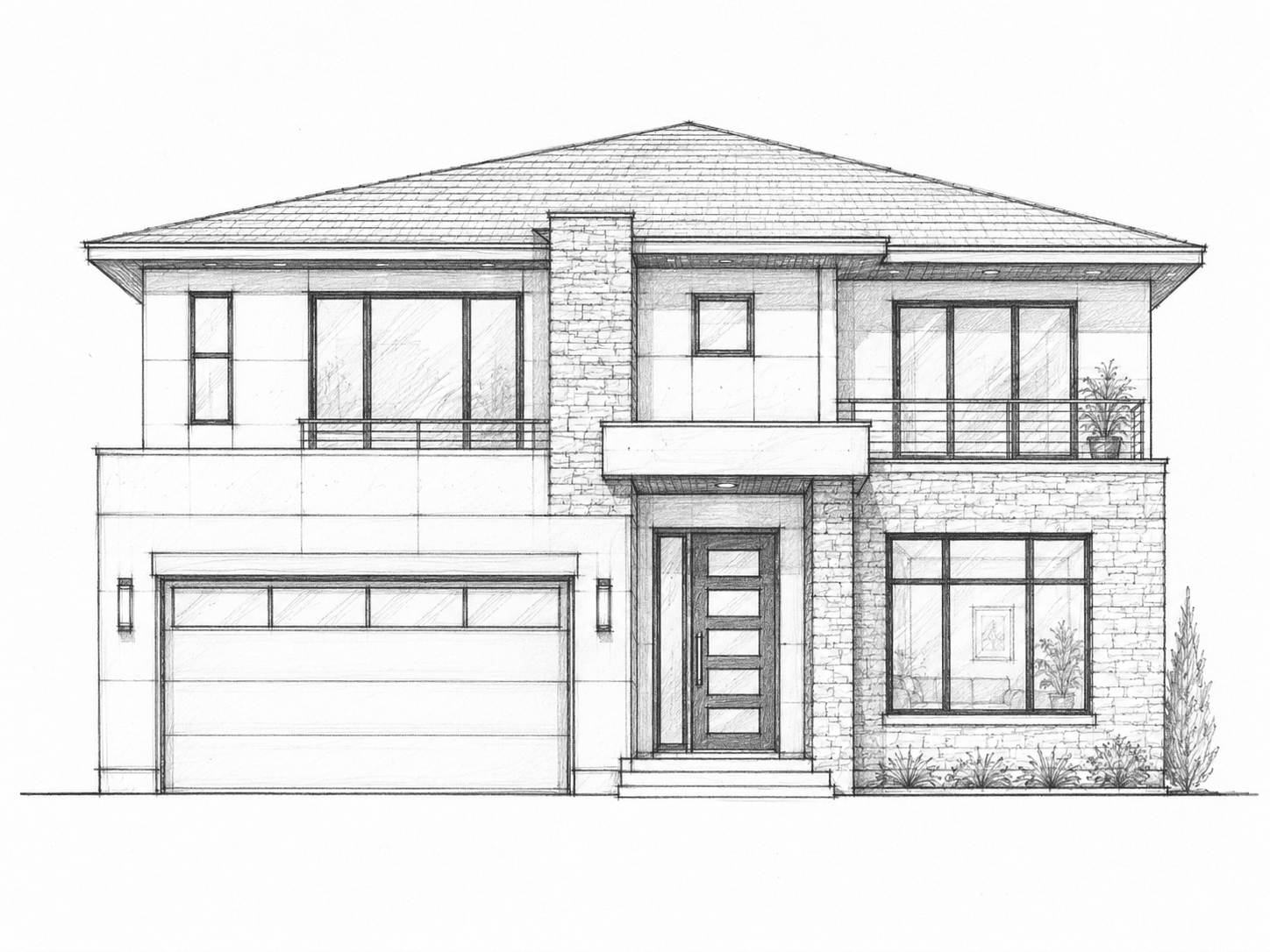
A ControlNet-based rendering pipeline collapses that process to a single API call. The input is an architectural sketch — a hand-drawn elevation, a CAD line drawing, a rough floor plan perspective. The output is a photorealistic render of that exact structure, in any style, in under five seconds. Same geometry. Different materials. Different lighting. Different atmosphere.
The technology has been available for two years. The B2B API layer that makes it trivially embeddable into architecture software, BIM platforms, and project management tools has not been built. That is the gap this article addresses.
| Stack | Infra /mo | AI team | Total cost | Revenue | Margin |
|---|---|---|---|---|---|
Runflow 10% volume discount applied | $2.7K | $0 | $2.7K | $25K | 89% |
Cloud API + manual QA similar pricing · no auto-QA · part-time engineer needed | $3.0K | ~$5K | $8.0K | $25K | 68% |
Self-hosted GPU raw compute · full-time AI engineer required | $400 | $12K | $12K | $25K | 50% |
Runflow Sentinel — built-in quality control layer that automatically detects and discards failed or low-quality outputs before delivery. You only pay for images that pass QA. No engineer needed to babysit the pipeline.
Pricing based on Runflow published rates (June 2026) with automatic volume discounts. Revenue column is illustrative — actual client pricing varies by vertical and contract size. GPU self-hosted estimate uses $0.04/img raw compute cost.
The rendering bottleneck in architecture
Architecture firms produce hundreds of concept sketches per project. Each sketch represents a design decision — a facade option, an interior layout, a massing variant. The vast majority of those sketches never become renders. The cost and time required to visualize every option is prohibitive, so firms select one or two directions and invest the render budget there. The rest remain as pencil lines.
This creates a fundamental problem in client communication. Architects think in three dimensions from two-dimensional drawings. Clients do not. A hand-drawn elevation that clearly communicates a building's proportions to a trained architect reads as abstract lines to a client. The render is the translation layer — the thing that makes the design legible to the person paying for it.
When renders are expensive and slow, client communication suffers. Design iterations that could have been resolved in a twenty-minute presentation instead require days of back-and-forth. Projects that could have been approved in week two get delayed to week eight because the client could not visualize the options until the firm could afford to render them.
How the ControlNet pipeline works
ControlNet is the technical breakthrough that makes sketch-to-render viable at production quality. It is a neural network architecture that conditions an image generation model on a structural guide — a depth map, an edge detection pass, a pose skeleton — so that the generated output follows the geometry of the guide rather than inventing its own.
Applied to architectural sketches, ControlNet treats the sketch as a structural constraint. The lines of the drawing define where walls, windows, and rooflines are. The diffusion model fills in the materials, lighting, and atmosphere specified by the style prompt. The geometry cannot drift. The proportions are locked. The stylistic treatment is fully controllable.
Stage 1 — Edge extraction
The input sketch is processed through a Canny edge detection pass to extract a clean edge map. This step normalizes the input — a rough pencil sketch, a clean CAD export, and a scanned hand drawing all produce comparable edge maps. The edge map is what ControlNet uses as its structural reference.
Stage 2 — Depth estimation
A depth estimation model generates a depth map from the sketch. For architectural drawings, this step is critical for interior renders — it provides the three-dimensional spatial information that makes generated rooms feel volumetrically correct rather than flat. For exterior elevations, the edge map carries more weight; depth estimation serves as a secondary constraint.
Stage 3 — ControlNet conditioning
The edge map and depth map are passed to ControlNet as conditioning inputs alongside the style prompt. The model generates an image that simultaneously satisfies the structural constraints from the controls and the aesthetic specifications from the prompt. The balance between structural fidelity and stylistic freedom is configurable via the ControlNet conditioning scale — higher values produce renders that follow the sketch more strictly; lower values allow more creative interpretation.
Stage 4 — Upscaling and detail pass
The base render is upscaled 4× using a real-ESRGAN model with architectural texture weights. A detail enhancement pass sharpens material textures — brick mortar lines, glass reflections, wood grain — without over-sharpening edges. The output is a full-resolution render suitable for client presentations, planning submissions, and marketing materials.
What the API call looks like
import requests

response = requests.post(
    "https://api.runflow.io/v1/run",
    headers={"Authorization": "Bearer YOUR_API_KEY"},
    json={
        "workflow": "arch-rendering-v3",
        "inputs": {
            "sketch_url": "https://your-cdn.com/facade-elevation.png",
            "style": {
                "preset": "modern-minimalist",
                "materials": ["white plaster", "aluminum frames", "concrete"],
                "lighting": "golden hour",
                "environment": "suburban"
            },
            "controlnet_strength": 0.85,
            "output_resolution": "2048x2048",
            "upscale": True
        }
    }
)

result = response.json()
# result["outputs"]["render_url"]      → CDN URL, expires in 24h
# result["outputs"]["processing_ms"]  → 4210
# result["outputs"]["edge_map_url"]   → edge extraction debug view
The style object accepts either a preset name (thirty presets covering the most common architectural styles from contemporary to traditional) or a free-text prompt for custom styles. The controlnet_strength parameter is exposed because different use cases require different fidelity levels — a concept exploration tool benefits from lower strength to allow creative variation, while a compliance visualization for a planning application needs high structural fidelity.
The three B2B buyers
Architecture and engineering firms
The primary buyer is the architecture firm itself. A firm doing 20 active projects generates hundreds of sketches per month that never get rendered under current economics. At $0.08 per render, rendering every concept sketch costs less per month than one manual render from a visualization studio. The workflow change is significant — designers get feedback on every option rather than the two options the firm could afford to render — but the cost argument is immediate and unambiguous.
The integration point for a firm is their existing design tools. Architects work in Revit, ArchiCAD, SketchUp, and Rhino. A plugin that exports the current view as a PNG and calls the rendering API — returning a photorealistic result in the same window within five seconds — fits the existing workflow without requiring a process change. The render appears where the sketch was. The designer keeps working.
BIM and CAD software vendors
Autodesk, Graphisoft, and McNeel (Rhino) each have plugin ecosystems. A rendering API that delivers production-quality results without requiring a dedicated rendering engine solves a real problem for their users — current in-software rendering is either slow (Revit's built-in renderer) or requires purchasing and learning a separate application (Enscape, Lumion, V-Ray). An API-backed rendering feature can be shipped as a lightweight plugin rather than a full rendering engine.
Construction project management platforms
Procore, PlanGrid, and Buildertrend manage the construction phase of projects that started as sketches months earlier. A rendering feature in these platforms serves a different use case: on-site visualization for contractors and clients who need to understand what finished work should look like. A site supervisor with a sketch of an unbuilt space who can generate a render showing the finished result in materials matching the spec sheet is better equipped to manage expectations and catch specification errors before they become expensive corrections.
Style presets and the professional color system problem
Architectural style is not arbitrary. Firms have house styles. Clients have brand guidelines. Planning authorities have appearance codes. A rendering API that produces stylistically consistent results — the same material treatment across all renders in a project, matching the firm's standard presentation palette — is significantly more useful than one that produces varied results based on prompt interpretation.
The solution is a preset system with locked material specifications. Each preset defines not just a style name but a specific material palette: the exact color values for the plaster, the reflectivity parameters for the glazing, the texture scale for the brick. Renders using the same preset across different sketches produce visually consistent outputs that read as part of the same design system.
| Preset | Materials | Lighting | Best for |
|---|---|---|---|
| modern-minimalist | White plaster, aluminum, concrete | Golden hour / overcast | Contemporary residential, commercial |
| scandinavian-warm | Light oak, linen white, stone base | Soft diffuse daylight | Residential interiors, Nordic commercial |
| industrial-loft | Exposed brick, steel, raw concrete | Late afternoon, urban | Office conversions, mixed-use |
| biophilic-green | Living walls, timber, weathered steel | Bright midday | Sustainable commercial, hospitality |
| mediterranean | Terracotta, warm stucco, stone | Warm afternoon | Residential, resort, hospitality |
| luxury-dark | Black steel, marble, dark timber | Dramatic low sun | High-end residential, retail |
| heritage-brick | Red/buff brick, timber sash, slate | Overcast British light | Conservation, period residential |
| glass-corporate | Full glazing, steel grid, concrete base | Overcast urban | Commercial office, civic |
Build vs. buy
The build path requires more than acquiring a GPU and running Stable Diffusion. ControlNet for architectural sketches requires fine-tuning on architectural drawing datasets — generic ControlNet models trained on photographs do not handle pencil sketches reliably. The depth estimation model requires calibration for architectural line drawings, which have different depth cues than photographs. The upscaling model requires architectural texture weights. Each of these is solvable, but each requires a trained ML engineer and several weeks of work.
| Cost component | Build in-house | API (Runflow) |
|---|---|---|
| GPU infrastructure (A10G, 2 reserved) | $6,000/mo | $0 |
| ML engineer (ControlNet fine-tuning + maintenance) | $12,000/mo | $0 |
| ControlNet dataset curation and training | $8,000 one-time | $0 |
| Inference cost at 2,000 renders/mo | included above | $120–200/mo |
| Plugin development (Revit/ArchiCAD) | same either way | same either way |
| Total monthly (steady state) | ~$18,000/mo | $120–200/mo |
| Time to first working render | 8–12 weeks | 1 day |
The $18,000/month in-house cost is the steady-state figure after the model is trained and the infrastructure is running. The first three months — during dataset curation, training, and evaluation — are significantly higher. For a software vendor adding this as a feature to an existing product, the build path delays the feature by a quarter and requires hiring or contracting ML expertise that is unrelated to their core product competency.
Latency and throughput benchmarks
| Input type | Edge extraction (ms) | ControlNet pass (ms) | Upscale (ms) | Total (ms) |
|---|---|---|---|---|
| Hand-drawn pencil sketch | 180 | 2,800 | 820 | 3,800 |
| CAD line export (PNG) | 90 | 2,400 | 820 | 3,310 |
| SketchUp viewport screenshot | 110 | 2,600 | 820 | 3,530 |
| Scanned technical drawing | 240 | 2,900 | 820 | 3,960 |
| Revit elevation export | 95 | 2,450 | 820 | 3,365 |
The ControlNet pass dominates latency. CAD exports produce cleaner edge maps and allow slightly faster conditioning — the model converges on a valid output faster when the structural lines are unambiguous. Hand-drawn sketches require more sampling steps to resolve the inherent ambiguity in organic line quality. The difference is under one second and imperceptible in practical use.
Accuracy: how faithfully does the render follow the sketch?
Structural fidelity is the metric that matters most for professional use. A render that looks beautiful but moves a window or changes a roofline is not useful — it may actively mislead clients or create errors in planning submissions. The pipeline is evaluated on three structural accuracy metrics.
| Metric | Score | Method |
|---|---|---|
| Window position preservation | 96.2% | IoU between sketch window regions and rendered openings |
| Facade proportion accuracy | 94.8% | Height:width ratio deviation < 3% |
| Roofline geometry match | 93.1% | Edge alignment score vs. sketch roofline |
| Overall structural fidelity | 94.7% | Composite score across all elements |
The 94.7% overall structural fidelity score means roughly 1 in 20 renders will have a minor structural deviation — a window slightly repositioned, a roofline angle slightly modified. For concept exploration, this is acceptable. For planning submission renders or client approval documents where specific geometry is being represented, the high-fidelity mode (controlnet_strength: 0.95) reduces the deviation rate to under 2% at the cost of approximately 30% longer processing time.
Input format requirements
The pipeline accepts any rasterized image of an architectural drawing. There are no strict requirements on line quality, paper texture, or drawing tool. Inputs that produce optimal results share three characteristics: clear line contrast against the background, consistent line weight, and sufficient detail at the element level (individual windows and doors distinguishable, not merged into a single opening).
Inputs that produce degraded results: photographs of physical sketches taken in poor lighting (shadow artifacts confuse the edge detector), highly textured paper backgrounds, and drawings with both structural lines and extensive annotation text overlaid. The annotation removal pre-processing option strips text and dimension lines from the input before edge extraction, which improves results for dimensioned technical drawings.
The planning and permitting use case
Planning authorities in the UK, EU, and North America increasingly accept photorealistic renders as supporting documents in planning applications, subject to a disclaimer that they are computer-generated visualizations rather than photographs. For firms preparing planning submissions, the ability to generate renders of every design variant considered — not just the submitted scheme — strengthens the application by demonstrating that alternatives were explored and the chosen design is optimal.
A renders-for-every-sketch approach that costs $0.08 per render changes the economics of a planning application. Instead of commissioning three or four studio renders at $800 each for the submission, a firm generates thirty renders across all design iterations for $2.40, selects the most effective six for the formal submission, and retains the full set as a design history record. The planning officer sees evidence of a thorough design process. The cost difference is $3,200 vs. $2.40.
Integration: the Revit plugin pattern
The most direct integration path for architecture firms is a plugin for their primary design tool. The Revit plugin pattern, which works identically for ArchiCAD and SketchUp with minor API differences, looks like this.
# Revit plugin pseudocode (Revit Python Shell / pyRevit)
import revit_api as rvt
import requests

def render_current_view():
    # Export current Revit view as PNG
    view = rvt.ActiveUIDocument.ActiveView
    export_path = rvt.export_view_as_png(view, resolution=2048)

    # Call rendering API
    with open(export_path, "rb") as f:
        response = requests.post(
            "https://api.runflow.io/v1/run",
            headers={"Authorization": f"Bearer {API_KEY}"},
            files={"sketch": f},
            data={
                "workflow": "arch-rendering-v3",
                "style_preset": get_project_style(),   # firm's standard preset
                "controlnet_strength": 0.85,
            }
        )

    render_url = response.json()["outputs"]["render_url"]

    # Display in Revit panel or open in browser
    rvt.open_url_in_panel(render_url)

# Triggered from Revit ribbon button or keyboard shortcut
render_current_view()
The firm sets its standard style preset once in the plugin settings. Every render produced by every designer on every project uses the same preset, producing visually consistent outputs without per-designer configuration. A project manager reviewing renders from five different designers sees a coherent visualization set, not five different interpretations of the same building.
Pricing for software vendors
| Tier | Price per render | Monthly minimum | SLA | Best for |
|---|---|---|---|---|
| Pay-as-you-go | $0.10 | None | 99.5% | Individual firms, testing |
| Studio | $0.08 | $80/mo | 99.9% | Firms up to 1,000 renders/mo |
| Platform | $0.05 | $500/mo | 99.95% | Software vendors, 1K–10K renders/mo |
| Enterprise | Custom | Custom | 99.99% + SLA | Large platform integrations |
For a software vendor adding this as a premium feature tier, the unit economics work at the Platform tier: $0.05 per render passed through to users at $0.15–0.25 per render (or bundled in a professional subscription at $50–100/month) produces 3–5× gross margin on the rendering cost. The feature tier creates a meaningful upgrade incentive — firms that render frequently will pay for the subscription to reduce per-render cost.
The window in the market
Autodesk has invested in generative design through its Forma product. The feature set is focused on site analysis and massing optimization, not photorealistic visualization from sketches. Enscape, Lumion, and V-Ray — the dominant real-time rendering tools — are full rendering engines requiring GPU workstations and multi-day learning curves. None of them offer a sketch-to-render API.
The CPC data reflects this gap. Keywords like architect 3d rendering and architectural rendering software attract CPC bids of $6–12 — among the highest in any software vertical. Companies are bidding this much because the problem is real, the buyer has budget, and the search intent is commercial. No existing product fully owns the sketch-to-render API position.
For a developer building a Revit plugin or an architecture platform adding a rendering feature, the API path delivers a working product in days rather than quarters. The structural fidelity numbers are sufficient for professional use. The pricing is an order of magnitude cheaper than manual rendering. The integration footprint is one REST endpoint. The market is waiting for someone to ship this.