Paint brands know the conversion problem intimately. A shopper arrives at a store or website with a color in mind, picks up 3-5 samples, takes them home, tapes them to the wall, and still cannot decide. The sample patch is too small. The lighting is different. The color looks nothing like the chip. They come back the next weekend and repeat the process. Industry research puts the conversion loss at the color selection step at 40-60% of shoppers who express purchase intent.
The problem is identical for flooring. A shopper holds a 4x4 inch laminate sample next to their existing furniture, tries to imagine how 800 square feet of it would look, and fails. The spatial leap from sample to room-scale is too large for most buyers to make confidently. They delay, they abandon, they buy something safe and regret it.
| Stack | Infra /mo | AI team | Total cost | Revenue | Margin |
|---|---|---|---|---|---|
Runflow 10% volume discount applied | $900 | $0 | $900 | $7.5K | 88% |
Cloud API + manual QA similar pricing · no auto-QA · part-time engineer needed | $1.0K | ~$5K | $6.0K | $7.5K | 20% |
Self-hosted GPU raw compute · full-time AI engineer required | $400 | $12K | $12K | $7.5K | loss |
Runflow Sentinel — built-in quality control layer that automatically detects and discards failed or low-quality outputs before delivery. You only pay for images that pass QA. No engineer needed to babysit the pipeline.
Pricing based on Runflow published rates (June 2026) with automatic volume discounts. Revenue column is illustrative — actual client pricing varies by vertical and contract size. GPU self-hosted estimate uses $0.04/img raw compute cost.
The two problems the visualization API solves
Paint and flooring brands face two distinct but related conversion problems. The first is the imagination gap: buyers cannot translate a small sample into a full-room mental picture. The second is the commitment gap: even when a buyer likes a color in the abstract, applying it to their specific room - with their furniture, their natural light, their existing finishes - requires a leap of faith that many buyers are not willing to make at $40-80 per gallon or $3-8 per square foot.
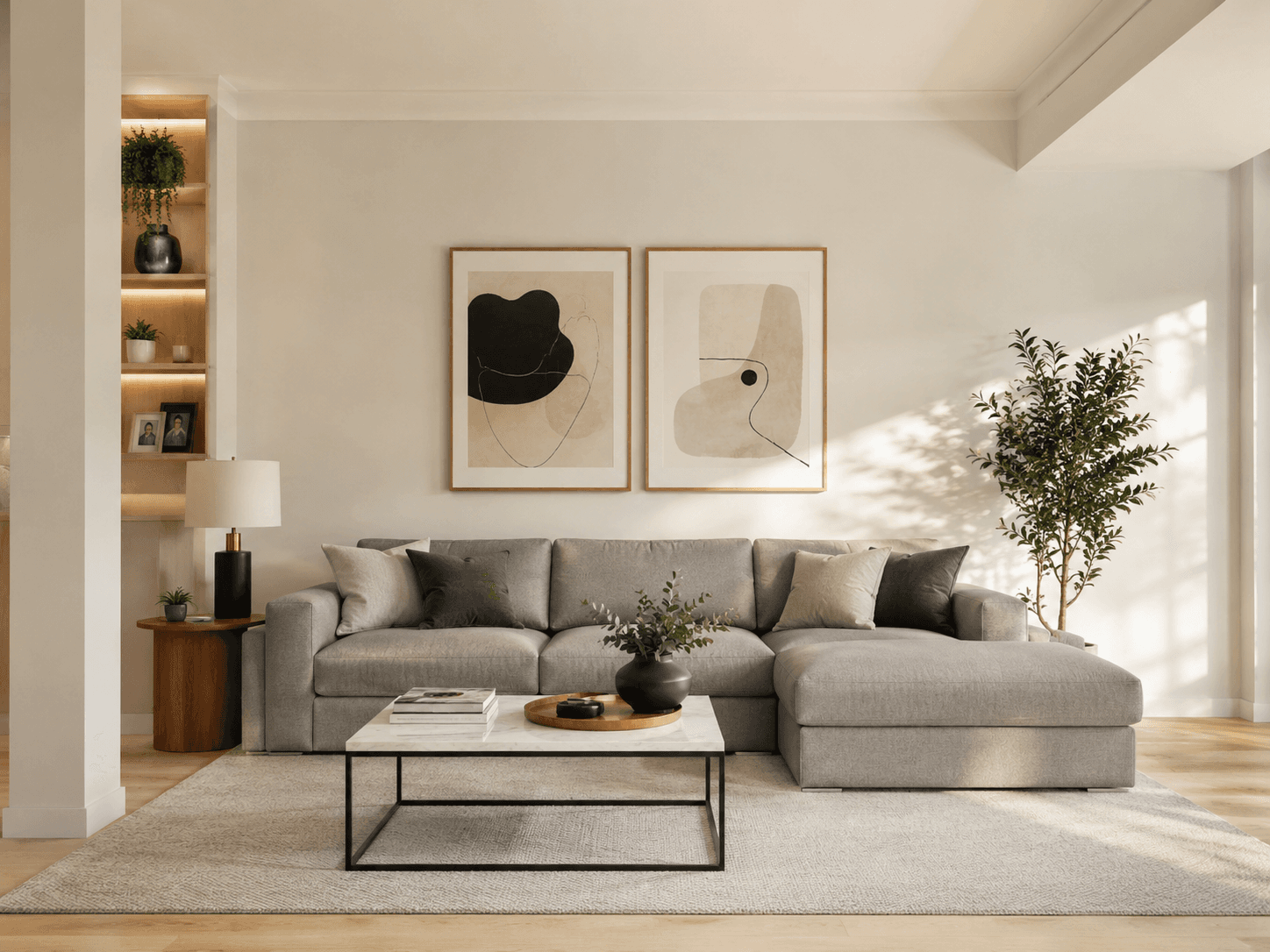
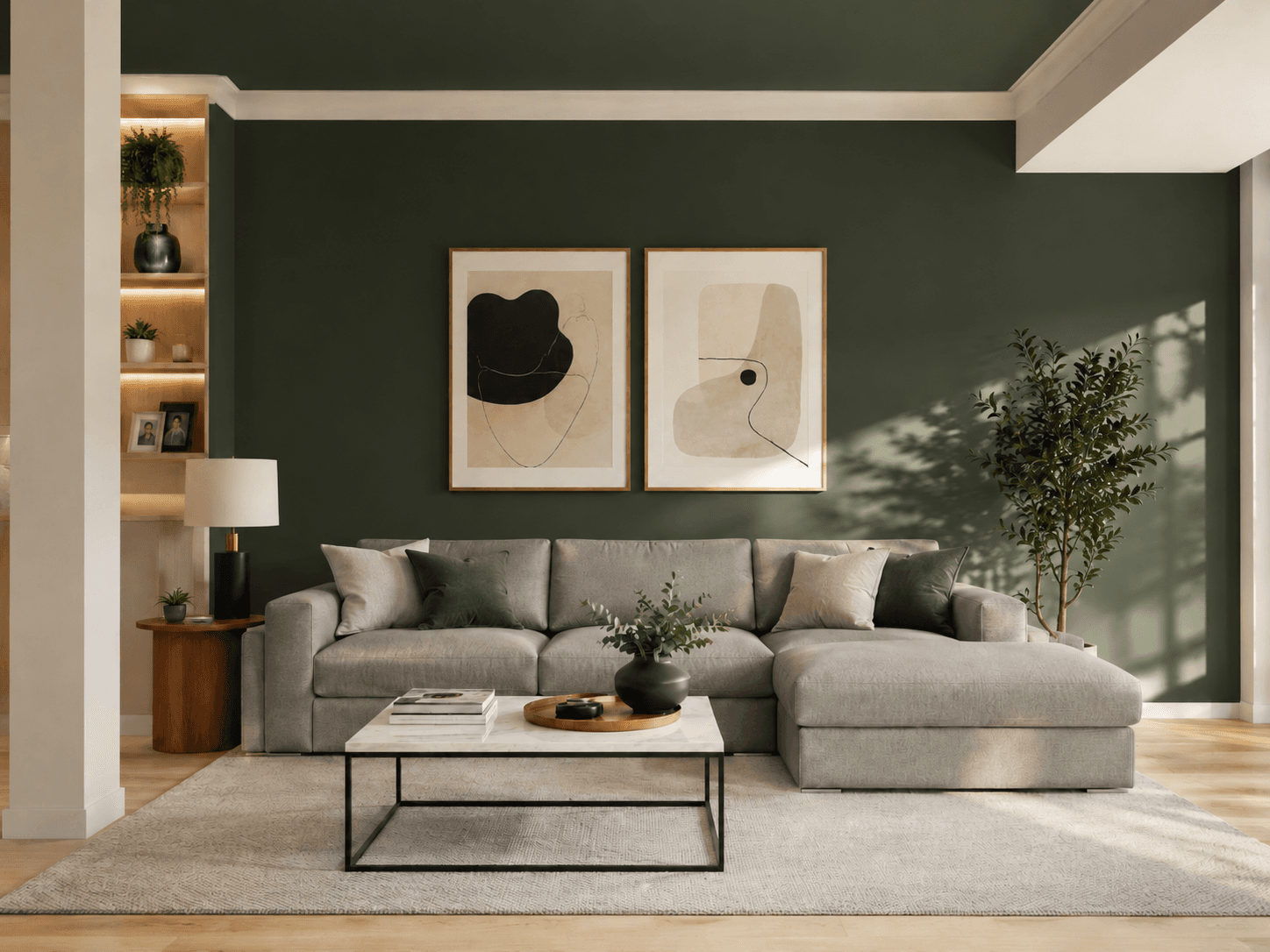
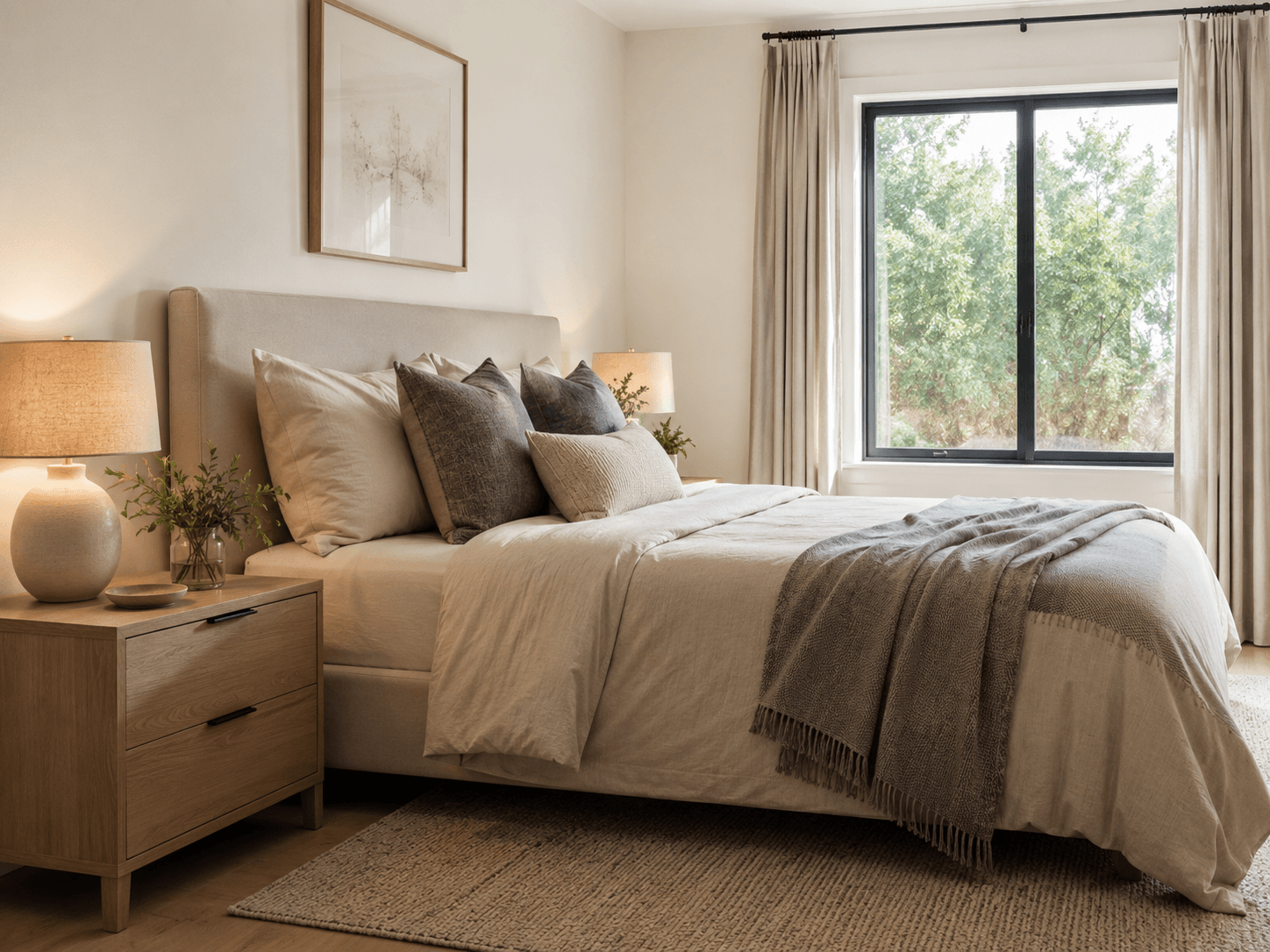
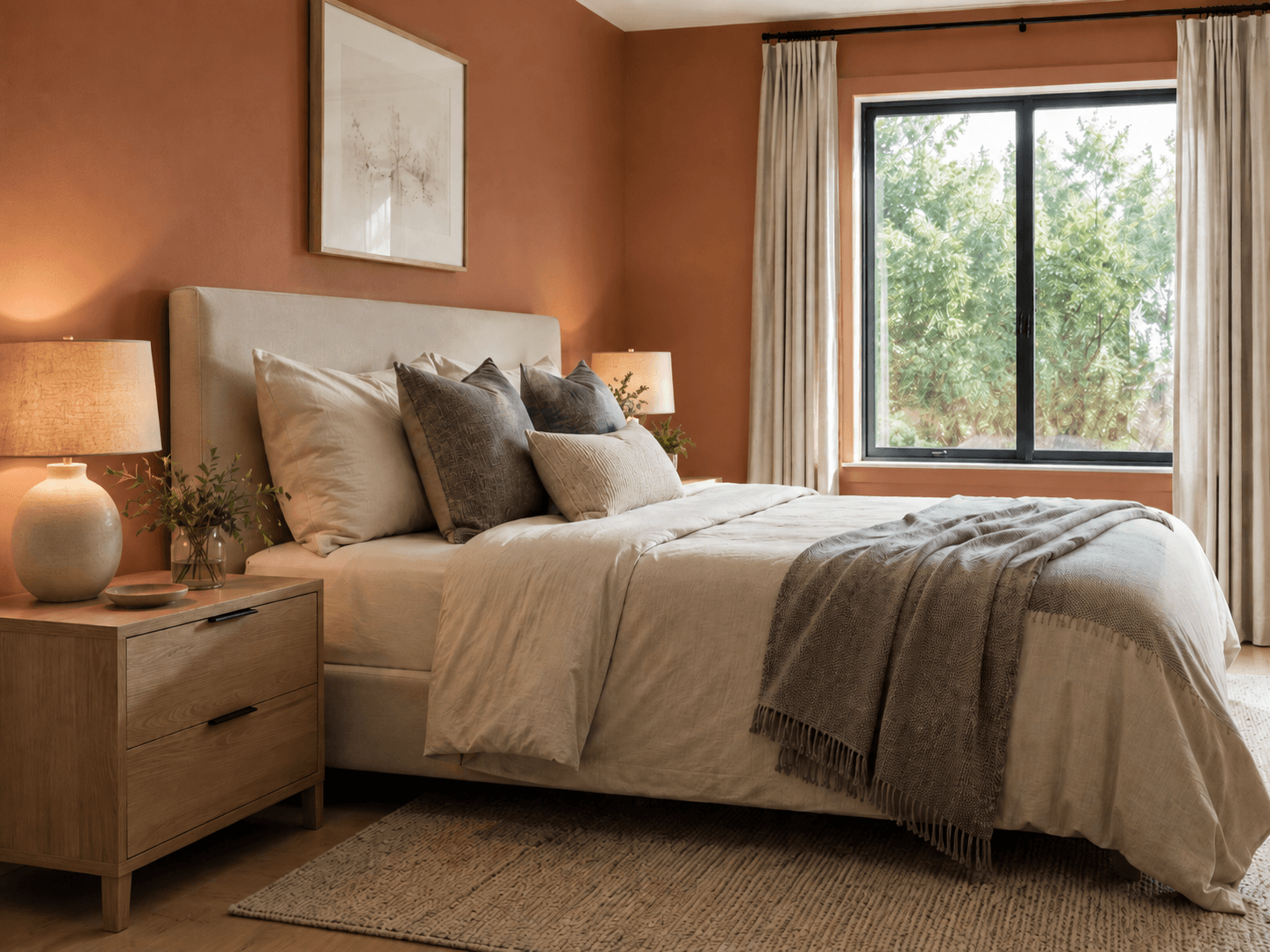
Room visualization addresses both problems simultaneously. By uploading a photo of their actual room and selecting a color or finish, the buyer sees their specific room transformed - not a staged model room, not a color chip on white background. Their sofa, their light, their floor plan. The psychological shift from abstract evaluation to concrete preview collapses both the imagination gap and the commitment gap in a single interaction.
The business case is not theoretical. Sherwin-Williams reported that users of their ColorSnap Visualizer tool converted at significantly higher rates than non-users. Benjamin Moore built a standalone iOS and Android app for room visualization. Home Depot integrated a paint visualizer into their mobile app. The market signal is clear: visualization tools work, brands that build them see measurable conversion uplift, and the brands that do not build them are leaving measurable revenue on the table.
The technical pipeline
The paint and floor swap pipeline runs four stages. The pipeline differs depending on whether the target surface is a painted wall or a flooring material - the segmentation approach and the texture mapping are different for each surface type.
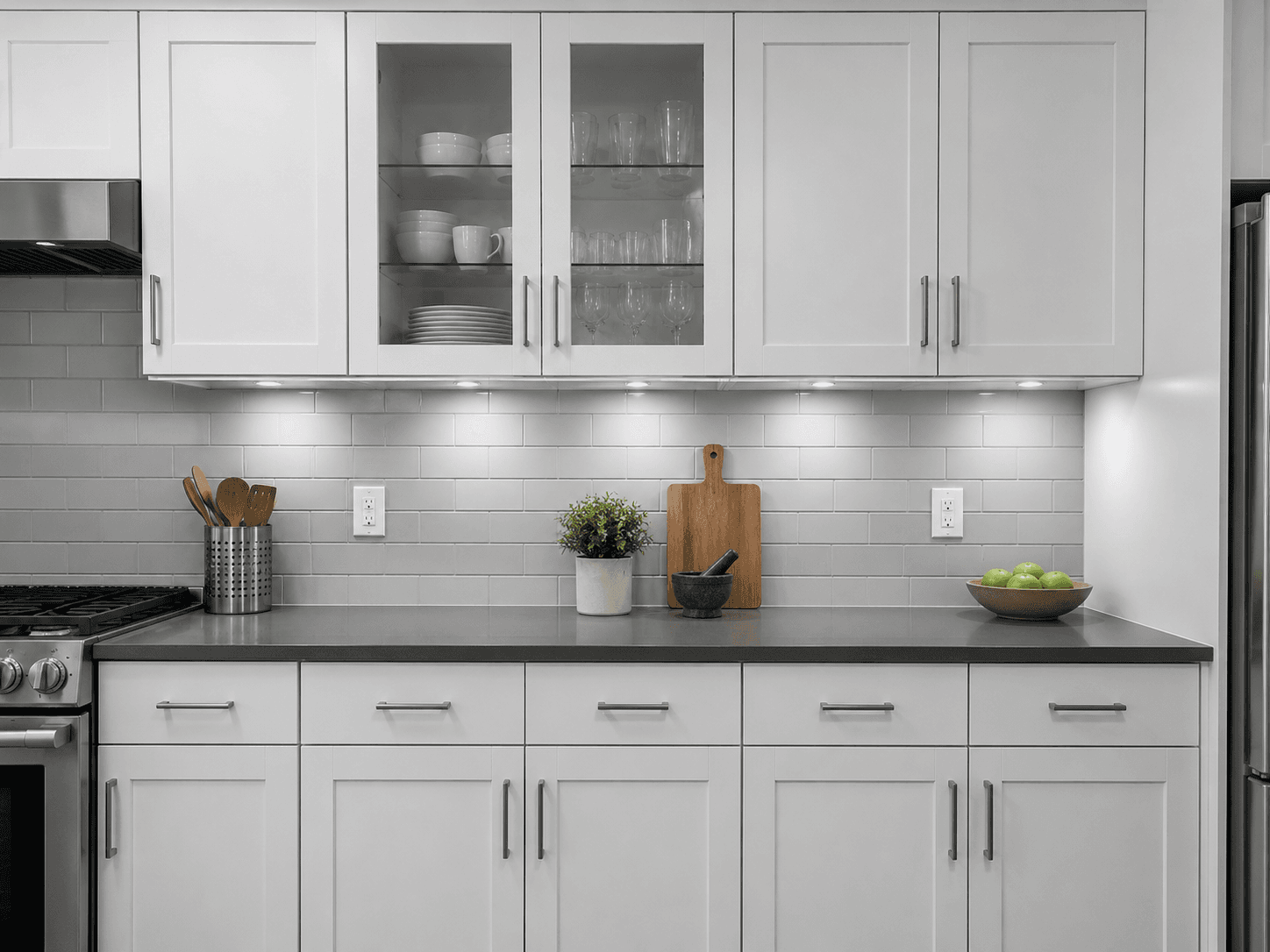
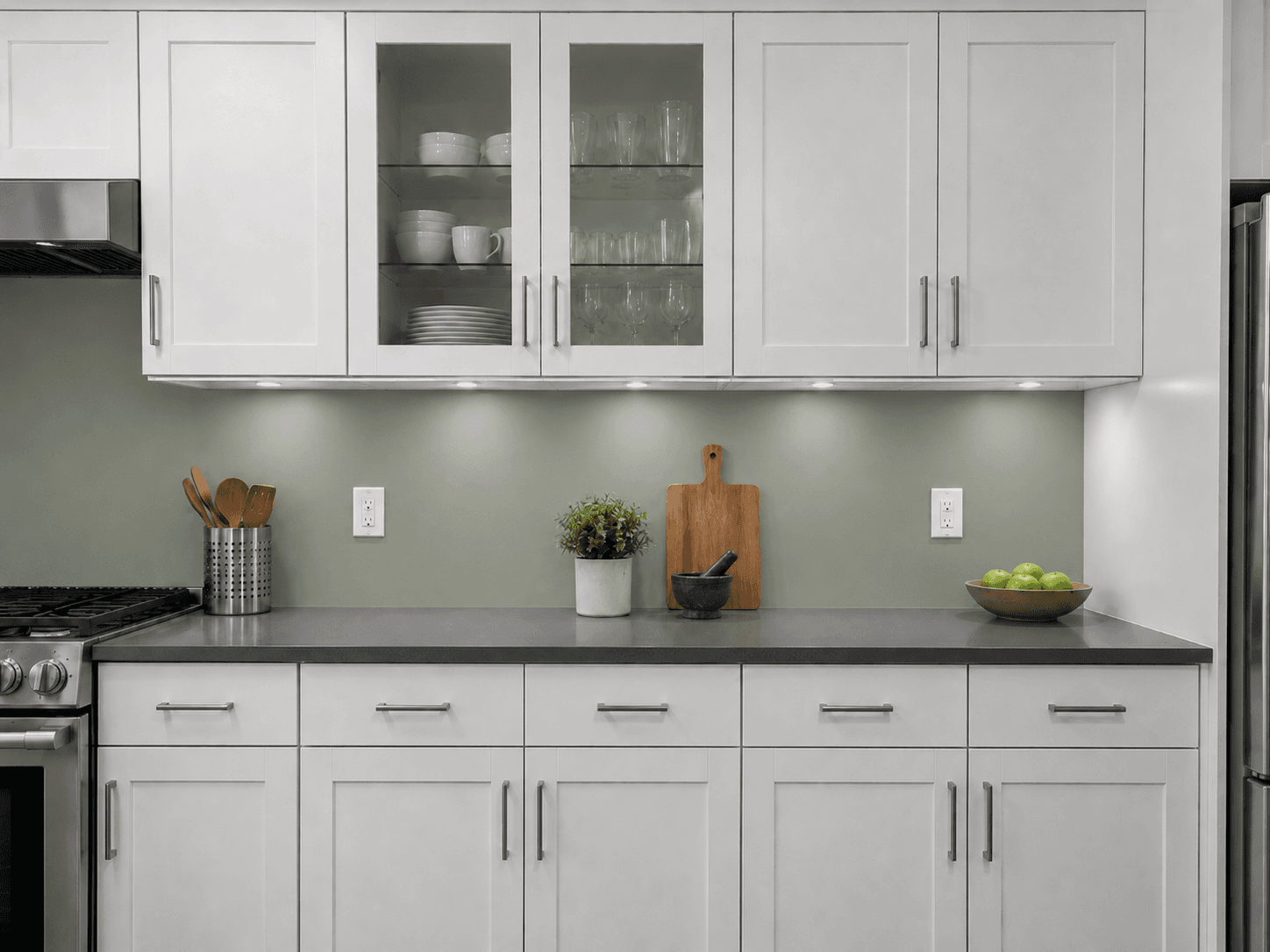
Stage 1 - Surface segmentation: the room photo is analyzed to detect and segment the target surface. For wall paint, the segmentation model identifies wall planes and distinguishes them from ceiling, trim, furniture, and windows. For flooring, the model identifies the floor surface and its boundary with walls, baseboards, and furniture legs. Surface segmentation is the most technically demanding step - a room with complex geometry, multiple furniture pieces, or inconsistent lighting presents a harder segmentation problem than a clean staged room.
Stage 2 - Surface analysis: the current surface color and texture are analyzed to establish a baseline for the transformation. For paint, this means extracting the dominant wall color and the ambient lighting characteristics of the room. For flooring, this means characterizing the current floor texture, grain direction (for wood), and sheen level. This analysis informs the color/texture mapping in stage 3 - without it, the replacement surface looks pasted rather than integrated.
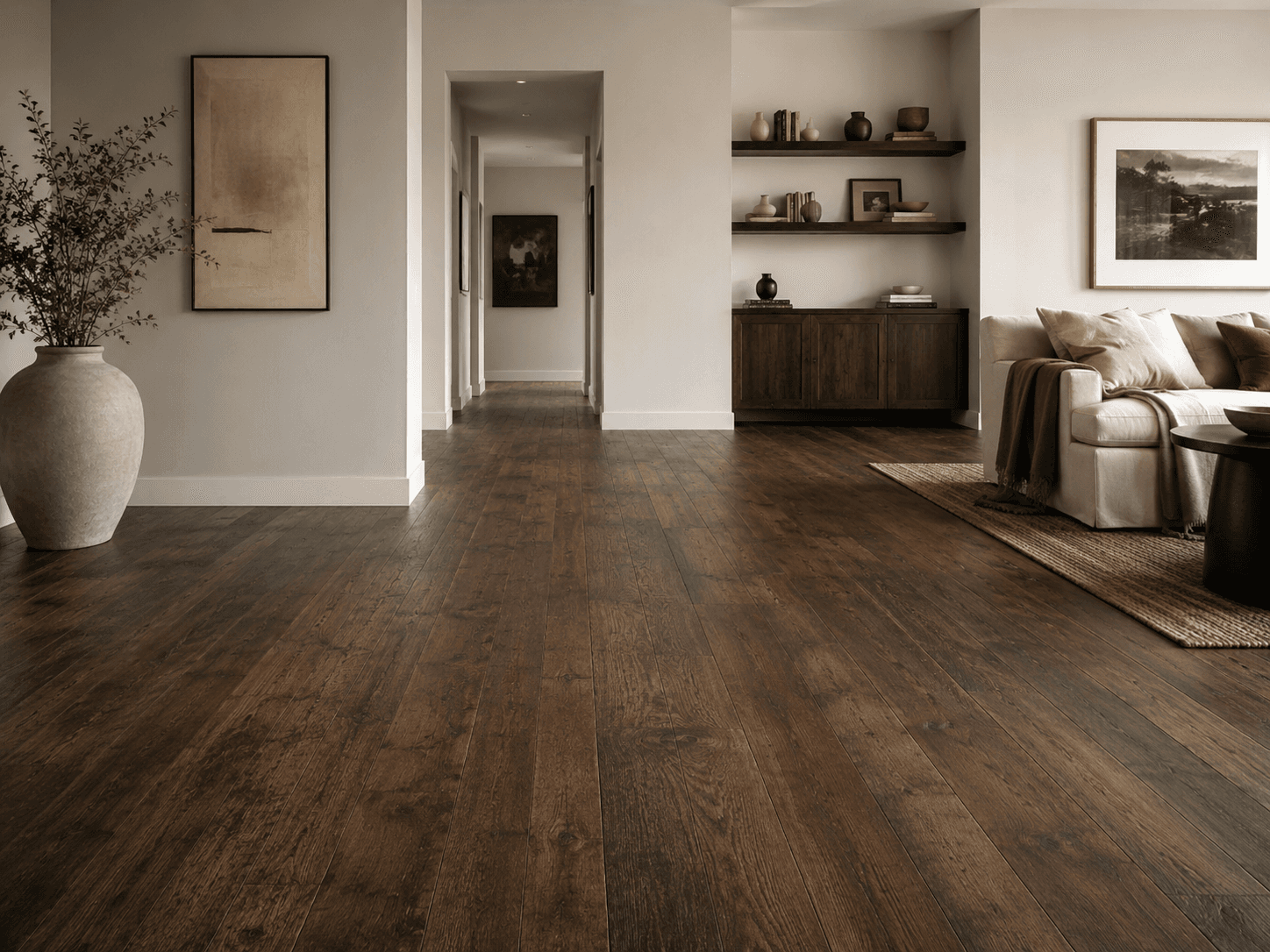
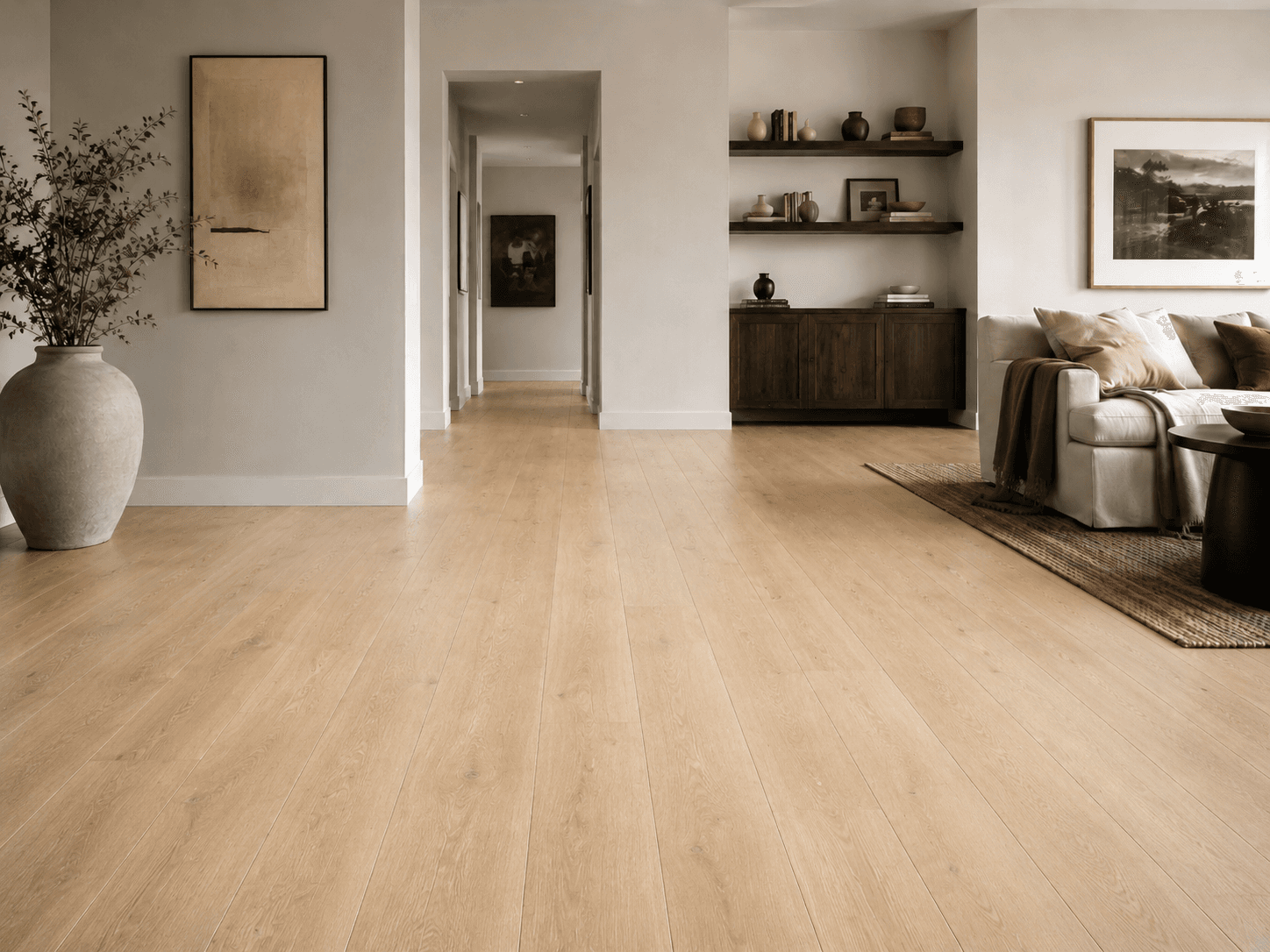
Stage 3 - Color or texture mapping: the target color or flooring texture is applied to the segmented surface. For paint, a color transformation is applied that maps the source wall pixels to the target color while preserving the shading, shadow, and highlight structure of the original - a wall with a patch of sunlight retains that patch after the color change. For flooring, a texture transfer applies the target material (oak planks, stone tile, carpet) to the floor area, with correct perspective foreshortening and scale matching the room dimensions.
Stage 4 - Lighting correction and compositing: the transformed surface is composited back into the room photo with lighting correction applied. The new surface inherits the ambient light characteristics of the room - a warm-lit room makes the new paint color look warmer than the same color in a cool-lit room. Lighting correction ensures the visualization reflects how the color or material will actually appear in the buyer's space, not how it appears in a controlled studio environment. Without this step, the visualization is technically correct but perceptually wrong.
Paint versus flooring: different pipeline requirements
Paint and flooring swaps share the same pipeline architecture but differ in their technical requirements at the texture mapping and lighting correction stages.
Paint swap: the transformation is a color replacement with lighting preservation. The primary challenge is handling complex wall geometry - corners, recesses, areas behind furniture that are partially visible - and maintaining photorealism at surface transitions (where wall meets trim, where sunlight patches fall). The pipeline also needs to handle multi-color rooms where the buyer wants to change one wall or one room while leaving the rest unchanged. Per-surface masking controls which surfaces are transformed.
Floor swap: the transformation is a material replacement with perspective and scale correction. The primary challenge is texture mapping with correct foreshortening - a wood floor has grain that runs in a specific direction, and the perspective of the room photo determines how that grain appears at different distances from the camera. A flooring texture applied without perspective correction looks flat and obviously artificial. The pipeline uses the room geometry detected in stage 1 to apply the correct perspective transform to the target material texture.
Multi-surface swaps: a higher-tier feature is swapping both paint and flooring in a single visualization - showing the buyer how a new floor color looks with a new wall color simultaneously. This requires running the pipeline twice in sequence (floor first, then walls) or in parallel with compositing. Multi-surface visualization is the highest-converting feature because it answers the buyer's real question, which is not just how will this floor look but how will this floor look with these walls.
ICP and commercial structure
Three buyer types exist for a paint and floor visualization API, each with different integration patterns and commercial structures.
Paint brands are the primary buyer. Sherwin-Williams, Benjamin Moore, and Behr have built proprietary visualization tools. The gap is the mid-market and private-label paint brands that do not have the engineering resources to build and maintain a visualization tool in-house. A white-label API that a mid-size paint brand can integrate into their website or app gives them the same conversion capability as the big players at a fraction of the build cost. The commercial structure is usage-based - pay per visualization - with a white-label option for brands that want the tool to feel native to their product.
Home improvement retailers are the second buyer. A retailer carrying 50 paint brands and 30 flooring lines needs a single visualization tool that can render any product in their catalog. A catalog-connected API - where the retailer uploads their product catalog and the API maps SKUs to renderable colors and textures - is the integration pattern. The retailer charges for the tool as a premium service or offers it free to drive basket size. Home Depot and Lowe's have built this in-house; regional and specialty retailers have not.
Interior design and renovation platforms are the third buyer. Platforms like Houzz, Havenly, or any renovation planning tool need visualization features as part of their core product. A room visualization API is a building block they can compose into a larger planning tool without building the underlying image generation infrastructure.
Unit economics
Cost comparison across integration tiers:
| Scenario | In-house build | Managed API (Runflow) | Saving |
|---|---|---|---|
| Initial build | $150-400K engineering | $0 | 100% |
| Ongoing infra/team | $8-15K/mo | $0 | 100% |
| 10K renders/mo | Sunk cost | $800-1,500 | N/A |
| 100K renders/mo | Sunk cost | $8-15K | N/A |
| Time to first render | 6-12 months | 3-4 weeks | N/A |
The build-vs-buy calculus for this category is straightforward. In-house visualization tools at Sherwin-Williams or Benjamin Moore required multi-year, multi-million dollar engineering investments. The same outcome is available via managed API at $0.08-0.15 per render with no infrastructure overhead. For any brand that is not one of the top three paint manufacturers in the world, building in-house does not make financial sense.
Competitive landscape
| Product | Type | API access | White-label | Floor support |
|---|---|---|---|---|
| ColorSnap (Sherwin-Williams) | Proprietary consumer app | No | No | No |
| Color My Room (Behr) | Proprietary consumer app | No | No | No |
| Houzz View in My Room | AR mobile only | No | No | Partial |
| Roomvo | B2B flooring visualizer | Limited | Yes | Yes |
| Full pipeline API (gap) | REST API, any surface | Yes | Yes | Yes |
Roomvo is the closest existing product - a B2B flooring visualization tool used by flooring retailers. Its gap is paint (walls only, no flooring) and API flexibility - it is a SaaS product with a fixed integration pattern, not a composable API. The open gap is a surface-agnostic visualization API that handles both paint and flooring, exposes a clean REST endpoint, and supports white-label deployment for brands that want the tool to feel native to their product.
How to build it: the 30-day path
Week 1: surface segmentation. Build and validate the wall segmentation model on a diverse set of room photos - open-plan spaces, rooms with heavy furniture, rooms with complex geometry. Define the failure cases: what room configurations produce unreliable segmentation, and how does the pipeline handle them? Build the floor segmentation model separately - floor and wall segmentation use different model architectures because the geometry and occlusion patterns are different.
Week 2: color and texture mapping. For paint, build the color transformation node and test it against the Sherwin-Williams, Benjamin Moore, and Behr color libraries - the major brands publish their color codes publicly. Validate that the transformation is photorealistic under varied lighting conditions. For flooring, source or generate reference textures for the 10-20 most commercially relevant floor materials (light oak, dark walnut, stone tile, carpet, laminate) and build the perspective-correct texture mapping node.
Week 3: lighting correction and multi-surface support. Build the lighting correction node. Test the full pipeline end-to-end against 50 room photos representing different room types, lighting conditions, and surface complexities. Add multi-surface swap support - the ability to transform floor and walls in a single API call. Define the output format: single rendered image, before/after pair, or side-by-side comparison.
Week 4: brand catalog integration and first pilot. Build the catalog connection layer - a mechanism for brands to upload their color or material catalog and have it mapped to renderable inputs. Run a pilot with one paint brand and one flooring retailer. Measure visualization-to-purchase conversion versus non-visualization sessions. The conversion delta from this pilot is the commercial story for expansion.
| Stack | Infra /mo | AI team | Total cost | Revenue | Margin |
|---|---|---|---|---|---|
Runflow 10% volume discount applied | $900 | $0 | $900 | $7.5K | 88% |
Cloud API + manual QA similar pricing · no auto-QA · part-time engineer needed | $1.0K | ~$5K | $6.0K | $7.5K | 20% |
Self-hosted GPU raw compute · full-time AI engineer required | $400 | $12K | $12K | $7.5K | loss |
Runflow Sentinel — built-in quality control layer that automatically detects and discards failed or low-quality outputs before delivery. You only pay for images that pass QA. No engineer needed to babysit the pipeline.
Pricing based on Runflow published rates (June 2026) with automatic volume discounts. Revenue column is illustrative — actual client pricing varies by vertical and contract size. GPU self-hosted estimate uses $0.04/img raw compute cost.
Technical edge cases
Three technical edge cases define the quality ceiling for this pipeline and are worth scoping explicitly before the first version is built.
Rooms with complex natural lighting: a room with strong directional sunlight produces wall areas with significantly different apparent colors depending on whether they are in direct light, indirect light, or shadow. A flat color transformation applied uniformly across the wall fails on these rooms - the lit and shadowed areas need to be transformed differently to maintain the photorealistic appearance. The pipeline needs a per-pixel lighting analysis that preserves the relative luminance structure of the original wall even after the color is changed.
Floors partially obscured by furniture: segmenting a floor that is covered by a rug, furniture legs, or low furniture requires the model to infer the floor surface under the occluding objects. The pipeline either leaves occluded areas untransformed (safe but produces a partially-complete visualization) or uses inpainting to generate the target floor texture under the furniture (more complete but more prone to artifacts). For a first version, leaving occluded areas untransformed is the correct choice - it looks less dramatic but is more reliable.
Trim and accent wall handling: many rooms have trim (baseboards, crown molding, window frames) that should not change color when the wall is transformed. The segmentation model needs to reliably distinguish wall from trim. Separately, accent wall visualization - where one wall is transformed while others remain the same - requires per-wall segmentation rather than global wall segmentation. Both are solvable but add pipeline complexity that should be scoped as version 2 features rather than blocking the initial launch.
Internal links
The virtual staging pipeline uses the same surface segmentation infrastructure as this pipeline. See Virtual Staging API for the architectural approach.
For GPU provider selection at this workload, see the GPU Provider Selection Matrix.